What Is a Marine VHF Radio?
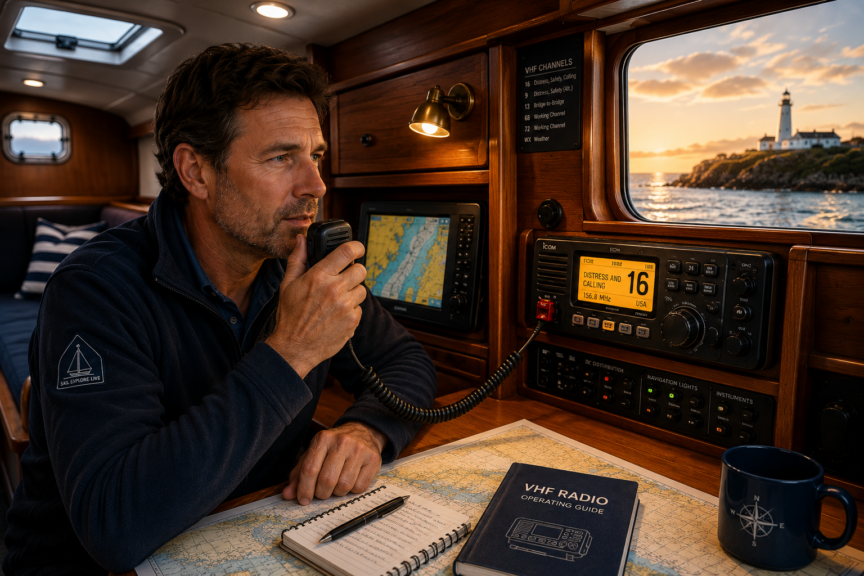
A marine VHF radio is one of those pieces of equipment that can sit quietly aboard your sailboat for hours without attracting much attention.
Then, suddenly, it can become one of the most important pieces of equipment you own.
VHF stands for Very High Frequency. Marine VHF radios use designated radio frequencies to allow boats, ships, marinas, harbour authorities, the Coast Guard and other marine stations to communicate with one another.
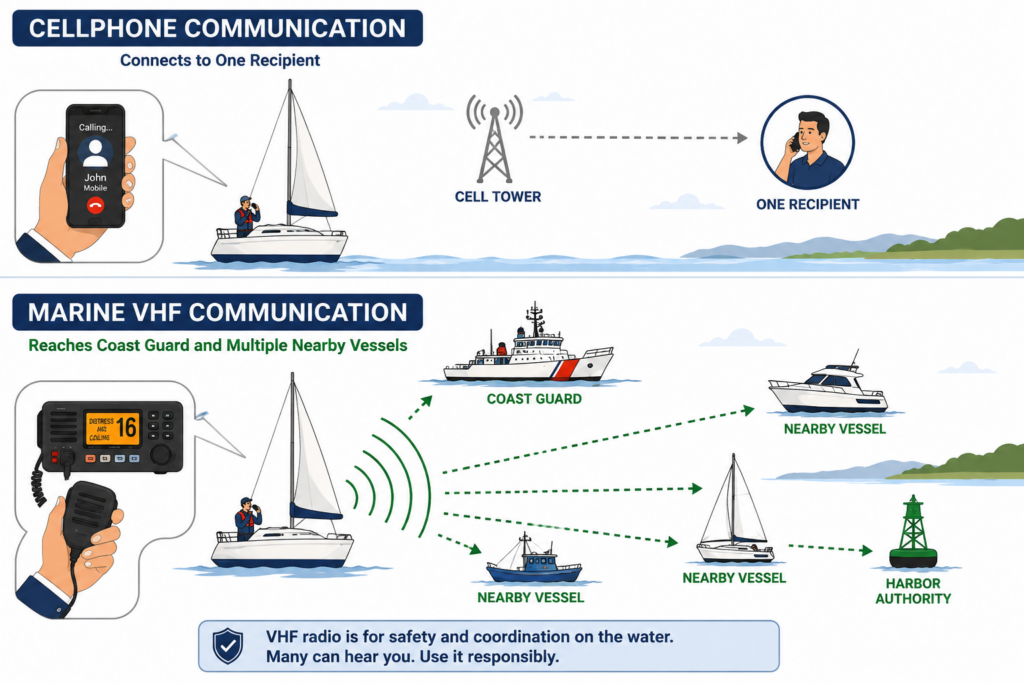
For a beginner, the important thing to understand is that a VHF radio does not work quite like a cellphone.
When you call someone on a cellphone, you are generally creating a private connection between two phones.
Marine VHF is different.
When you transmit on a marine VHF channel, other stations within radio range that are monitoring that channel may hear you.
That is enormously valuable during an emergency.
Imagine that you are sailing several miles from shore when you strike a submerged object. Water begins entering the boat faster than your bilge pump can remove it.
You could reach for your cellphone and call someone.
But who?
With the VHF radio, you can transmit a distress call that may be heard by the Coast Guard and by vessels in your immediate area.
One of those nearby boats might be able to reach you before anyone else can.
That ability to communicate with multiple nearby vessels is one reason marine VHF remains so important even though almost everyone carries a cellphone.
Beginner Tip: Think of your cellphone as useful backup communication. Think of your marine VHF as part of the boat’s primary marine safety equipment.
About this Guide
Written by Kelly Hiebert, a recreational sailor since 2002 and a middle-school teacher. Kelly created Sailboat Zone to provide beginners with clear, structured sailing education.
Last reviewed: September 2026
Jurisdiction: This guide focuses on recreational marine VHF practices in Canadian waters. Channel assignments, operator-certification requirements and procedures can vary by country and region. Canadian operators should follow current ISED and Canadian Coast Guard requirements, applicable local notices and their radio manufacturer’s instructions.
Primary sources:
- Canadian Coast Guard — Radio Aids to Marine Navigation 2026
- Innovation, Science and Economic Development Canada — Radio Operator Certification
- Innovation, Science and Economic Development Canada — Maritime Mobile Service Identities
Safety note: This article provides general educational information for beginner sailors. It does not replace an ROC-M course, current Canadian Coast Guard procedures, local channel assignments or the instructions for your specific radio. In an emergency, communicate clearly and follow directions from rescue authorities.
How Far Can a Marine VHF Radio Transmit?
This is a question beginners often ask, and unfortunately there isn’t one simple number.
Marine VHF communication is primarily line-of-sight.
That means antenna height matters enormously.
Imagine standing on a beach with a flashlight.
As something moves farther away over the horizon, eventually the curvature of the Earth gets in the way.
VHF radio behaves somewhat similarly.
A handheld VHF radio being used three feet above the water has a relatively low antenna.
A fixed VHF connected to an antenna at the top of a 45-foot sailboat mast has a much higher antenna.
Everything else being equal, that masthead antenna can communicate over a considerably greater distance.
Atmospheric conditions, terrain, antenna quality, transmitter power, installation quality and the height of the receiving antenna also affect practical range.
So instead of thinking:
“My radio has a range of exactly 20 miles.”
think:
“VHF range depends heavily on line of sight and antenna height.”
This also explains why a good antenna installation matters so much.
A powerful radio connected to a damaged antenna or poor coaxial connection may perform badly.
Fixed-Mount VHF Versus Handheld VHF
You’ll commonly encounter two types of marine VHF radios aboard recreational sailboats.
Fixed-Mount VHF Radio
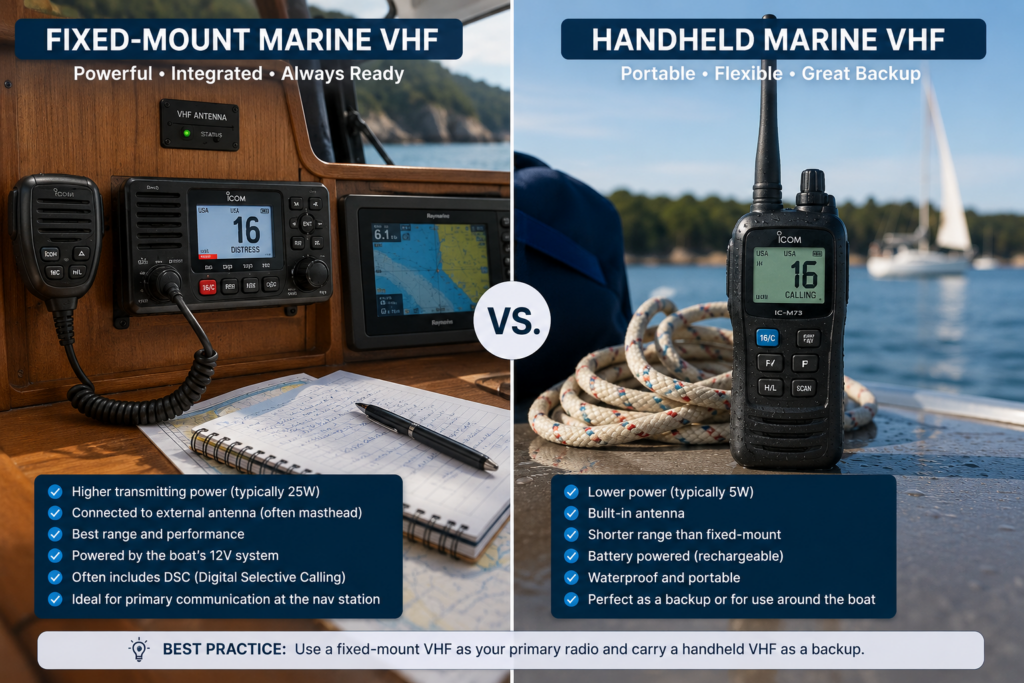
A fixed VHF is permanently installed aboard the boat.
It normally operates from the boat’s 12-volt electrical system and is connected to an external antenna. On a sailboat, that antenna is often installed at or near the masthead.
Fixed radios commonly offer higher transmitting power than handheld units and can provide excellent practical range when paired with a good masthead antenna.
Modern fixed units frequently include Digital Selective Calling, or DSC, which we’ll discuss later.
Handheld VHF Radio
A handheld VHF is portable.
That makes it extremely useful.
You can take it into the cockpit, carry it in the dinghy or keep it available if the boat loses electrical power.
Waterproof and floating models are particularly attractive aboard small boats.
Their limitation is range.
Handheld units generally transmit at lower power, and their antennas are much closer to the surface of the water.
For a cruising sailboat, a very useful combination is:
Fixed VHF + waterproof handheld VHF backup.
If the boat loses electrical power, you still have a radio.
If you’re forced out of the cabin, you still have a radio.
Redundancy matters when we’re talking about safety equipment.
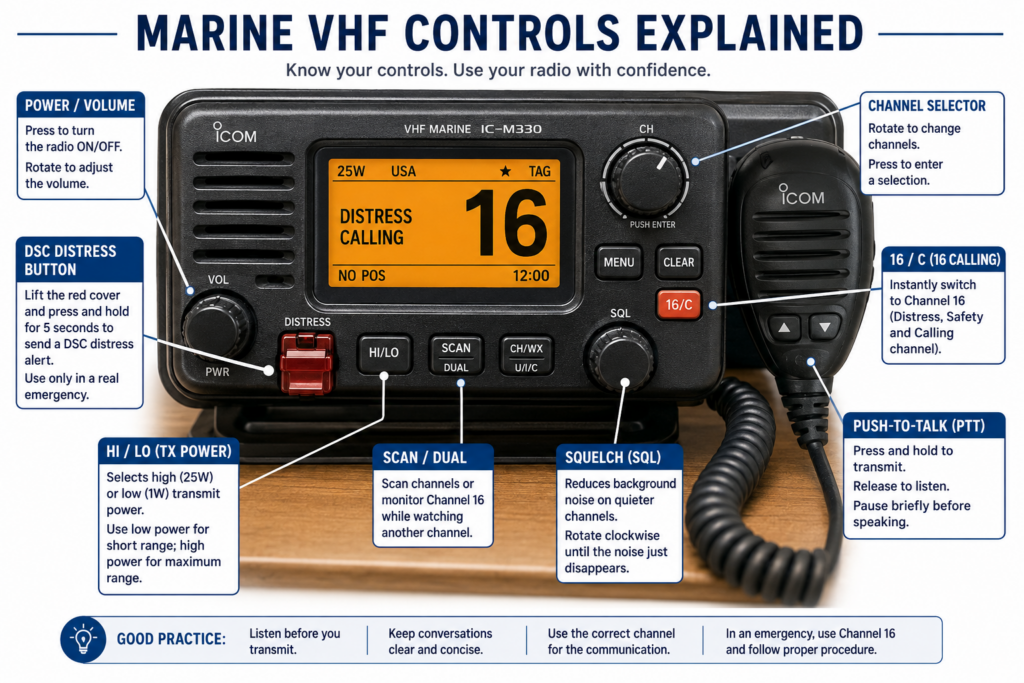
Learn the Basic VHF Controls
You don’t need to understand every menu option before leaving the dock.
You should, however, know the basic controls without having to search for them.
Sit at the navigation station with the radio manual and spend a few minutes learning the radio while the boat is safely secured.
Power and Volume
This turns the radio on and adjusts the speaker volume.
Set the volume high enough that you’ll hear an important transmission over normal boat noise.
A beautifully installed radio doesn’t help much if nobody can hear it.
Squelch
Squelch is one of those controls that confuses beginners because its purpose isn’t immediately obvious.
Turn the squelch down far enough and you’ll hear background radio noise or static.
Increase it until that unwanted noise just disappears.
That’s generally a useful starting point.
If you set squelch excessively high, however, you may suppress weak transmissions that you actually want to hear.
Channel Selector
This changes the selected VHF channel.
Depending on the radio, you may have a rotary knob, buttons on the microphone or both.
Channel 16 Button
Many marine radios have a dedicated 16 or 16/9 button.
Learn where it is.
If you’ve been talking on another channel, this button can quickly return you to Channel 16.
HI/LO Transmit Power
Many fixed marine VHF radios allow you to choose between high and low transmitting power.
The principle is simple:
Use low power when low power is sufficient.
Increase power when greater range is actually necessary.
Push-to-Talk Button
The button on the microphone is normally called PTT — Push to Talk.
Press it to transmit.
Release it to listen.
That second part is surprisingly important.
A nervous beginner sometimes keeps squeezing the button while waiting for an answer.
But while you’re transmitting, you aren’t listening to the other station.
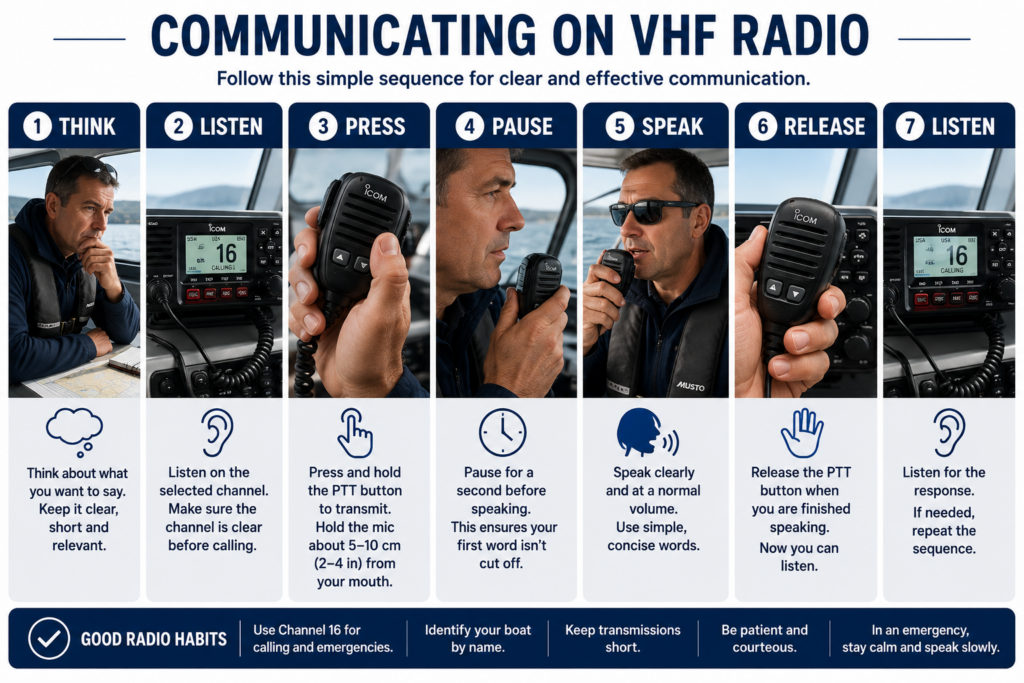
A simple routine helps:
Press → pause → speak → release → listen.
That tiny pause after pressing the button also helps prevent the beginning of your first word from being clipped.
Channel 16: The Channel Every Sailor Should Know
If you learn only one marine VHF channel before your first trip, learn:
Channel 16 — 156.8 MHz
Channel 16 is the international marine distress, safety and calling channel.
In Canadian waters, Marine Communications and Traffic Services operated by the Canadian Coast Guard maintains radio services that include monitoring Channel 16.
This channel has a special purpose.
Treat it accordingly.
You may hear distress calls.
You may hear Coast Guard communications.
You may hear vessels initially calling other vessels.
What you should not hear is someone telling a five-minute story about where they went for dinner last night.
Channel 16 is not a general chat channel.
Suppose you need to establish contact with another vessel.
You may make the initial call on Channel 16 when appropriate.
Once you’ve established contact, move the conversation to an appropriate working channel.
Think of Channel 16 as the lobby of a hotel.
You meet there.
You don’t hold your two-hour business meeting there.
Canadian sailors can learn more about marine communications services through the Canadian Coast Guard’s Marine Communications and Traffic Services information.
What Is a Working Channel?
This brings us to one of the first concepts that new radio users need to understand.
Not every marine VHF channel has the same purpose.
Some channels are assigned or designated for particular types of communication or services.
A working channel allows routine communications to continue without unnecessarily occupying Channel 16.
Imagine that you are aboard Wind Dancer and want to speak with your friend aboard Sea Rose.
You establish contact.
Then you agree to move.
For example:
“Sea Rose, this is Wind Walker. Switch to Channel 68. Over.”
Sea Rose replies:
“Wind Walker, Sea Rose. Switching to 68. Over.”
Both boats change channels.
Now you continue your conversation.
Simple.
One caution is important here:
Don’t assume that any channel number you remember is automatically appropriate everywhere.
Marine channel allocations and permitted uses can differ according to region and service.
Use the current channel information for the waters in which you’re operating.
Listen Before You Transmit
This may be the simplest lesson in this entire article.
It is also one of the most important.
Before pressing the microphone button:
Listen.
If somebody is already speaking, wait.
VHF radio is not like a group telephone call where everyone can speak simultaneously.
If two stations transmit at the same time on the same channel, they can interfere with each other.
This becomes especially important during busy summer boating periods.
You may pick up the microphone and already have your sentence prepared.
Don’t immediately press the button.
Listen.
Make sure the channel is clear.
Then make your transmission.
That small habit is part of good radio seamanship.
How to Speak on a Marine VHF Radio
New sailors sometimes become strangely formal the moment someone hands them a radio microphone.
Their voice changes.
Suddenly they’re trying to sound like an air traffic controller in a movie.
You don’t need a special radio voice.
You need to be understandable.
Speak slowly.
Speak clearly.
Use ordinary language.
Keep your transmission concise.
Don’t shout into the microphone.
Hold it at the distance recommended by the manufacturer.
Press PTT.
Pause briefly.
Speak.
Release PTT.
Listen.
If you need to transmit numbers, letters, coordinates or unfamiliar vessel names, slow down even more.
The objective isn’t to sound professional.
Clear communication is professional.
Marine Radio Etiquette for Beginners
Marine radio etiquette is really a combination of courtesy, efficiency and safety.
The basic rules are straightforward:
- Listen before transmitting.
- Keep transmissions concise.
- Identify your vessel clearly.
- Use the correct channel for the communication.
- Move routine conversations away from Channel 16.
- Don’t interrupt other transmissions unless safety requires it.
- Use only as much transmitting power as necessary.
- Don’t use marine channels for unnecessary chatter.
- Never transmit false distress messages.
- Remember that other people can hear you.
Here’s another habit worth developing:
Before pressing PTT, decide what you’re going to say.
You don’t need to memorize a script for every conversation.
Just take two seconds to organize the information.
That prevents transmissions like:
“Uh… marina… this is… um… sailboat… hang on, what’s our slip number again?”
Preparation makes radio communication much easier.
How to Make a Routine VHF Radio Call
Let’s practice.
You’re aboard the sailing vessel Wind Walker.
You want to contact another boat named Sea Rose.
Your initial call could sound like this:
“Sea Rose, Sea Rose, Sea Rose, this is Wind Walker, Wind Walker, Wind Walker. Over.”
Then release PTT.
Wait.
Sea Rose may answer:
“Wind Walker, this is Sea Rose. Over.”
You’ve established communication.
If the conversation is going to continue, move to an appropriate working channel.
“Sea Rose, Wind Walker. Switch to Channel 68. Over.”
Sea Rose acknowledges.
Both radios change channels.
Then continue.
Notice how little was actually said.
That’s intentional.
Marine radio procedure is designed to communicate necessary information efficiently.
What Do “Over” and “Out” Mean?
You’ve probably heard both words in movies.
They actually have specific meanings.
Over
Over means:
I have finished this transmission and expect you to reply.
Out
Out means:
This exchange is finished and I don’t expect a reply.
That’s why the famous phrase:
“Over and out.”
is contradictory.
One means:
“Your turn to speak.”
The other means:
“The conversation is finished.”
You don’t need both.
Calling a Marina by VHF Radio
Calling a marina is excellent real-world radio practice because the conversation is usually simple and predictable.
Before arriving, determine which VHF channel the marina monitors.
Don’t automatically assume Channel 16.
A marina may publish a specific working channel.
Know your basic vessel information before making the call.
That could include:
- vessel name
- vessel length
- beam
- current location
- expected arrival
- whether you’re requesting transient moorage, fuel or another service
Then make the call.
For example:
“Harbour Marina, Harbour Marina, this is sailing vessel Wind Walker. Over.”
Wait for the marina to respond.
Then follow its instructions.
If you’re approaching a marina while another crew member is available, this is a perfect job to delegate.
The helmsperson can concentrate on traffic, wind, current and boat control while the crew handles the radio.
How to Perform a Marine VHF Radio Check
You don’t want the first real test of your radio to occur when you need emergency assistance.
Check it beforehand.
But this does not mean repeatedly calling the Coast Guard on Channel 16 and asking:
“Radio check, radio check, radio check.”
Avoid unnecessary transmissions on the distress and calling channel.
Depending on your location, appropriate radio-check options may include a local automated radio-check service, a marina, harbour service or another station using an appropriate channel and procedure.
You should also physically inspect your equipment.
Check:
- the antenna
- coaxial cable and connectors
- electrical connections
- microphone
- speaker
- DSC configuration
- GPS/GNSS position input
- handheld radio battery
A VHF radio system includes much more than the black box mounted at the navigation station.
If the masthead antenna connection fails, the radio’s performance can be seriously compromised even though the display looks perfectly normal.
Mayday, Pan-Pan and Sécurité
Now we reach the part of marine radio that every sailor should understand before leaving the dock.
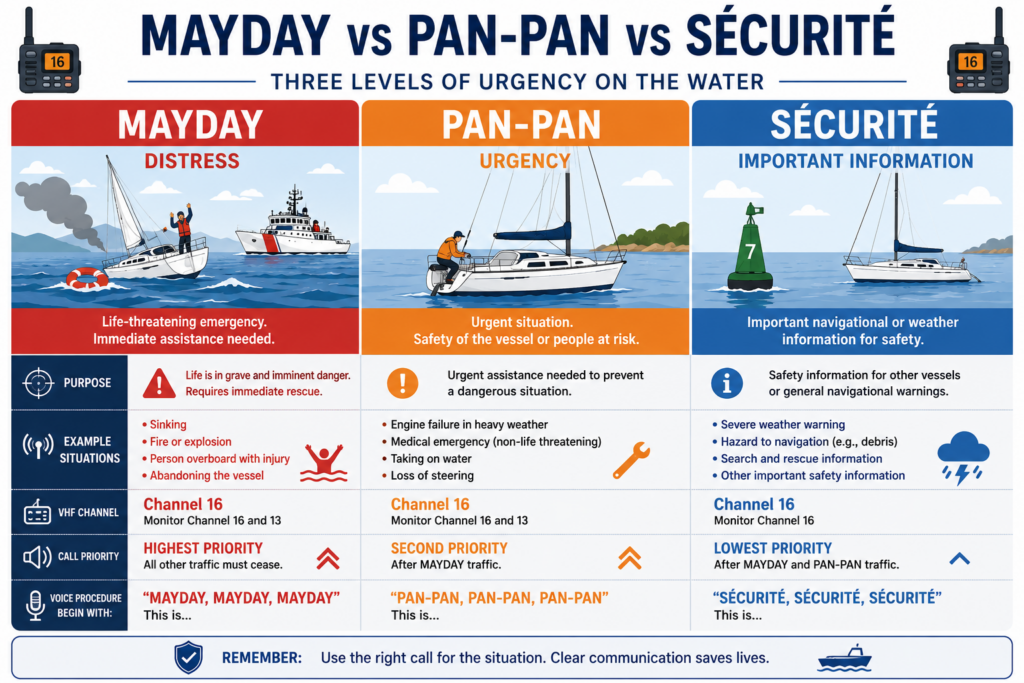
There are three important priority signals:
MAYDAY — Distress
PAN-PAN — Urgency
SÉCURITÉ — Safety
These words are not interchangeable.
They communicate different levels and types of priority.
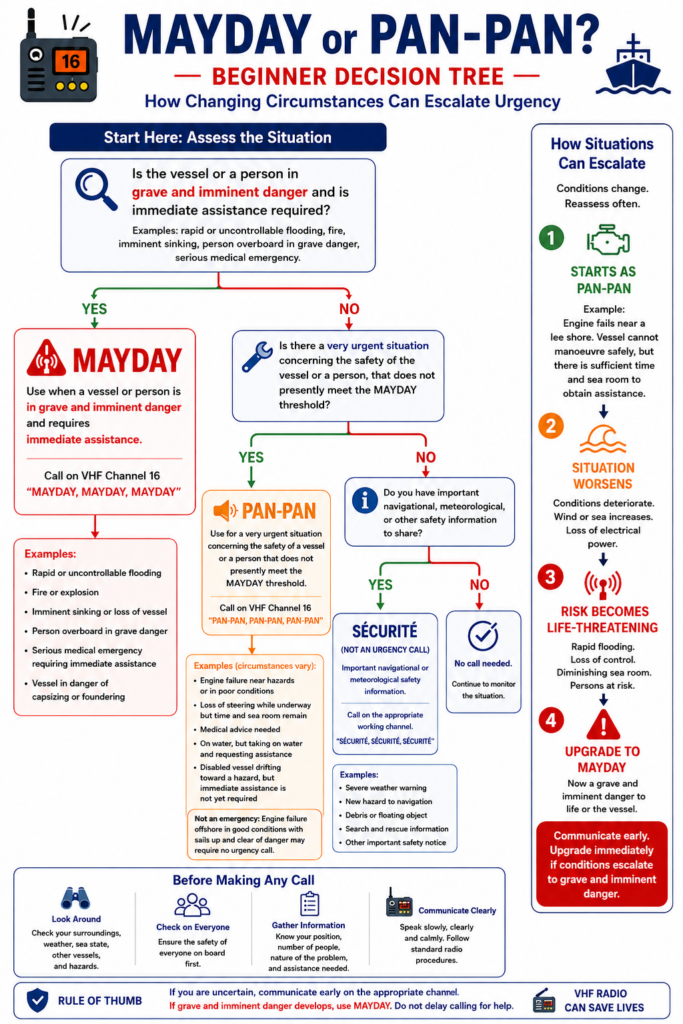
MAYDAY: When There Is Grave and Imminent Danger
Mayday is the international radiotelephone distress signal.
A Mayday indicates that a vessel, aircraft or person is threatened by grave and imminent danger and requires immediate assistance.
For a recreational sailor, examples might include:
- uncontrollable flooding
- fire aboard
- imminent sinking
- a serious collision
- a person overboard who cannot be recovered
- a life-threatening medical emergency
- abandoning the vessel
- grounding in dangerous conditions where the vessel or crew are in immediate danger
Notice that the deciding factor isn’t simply that something has gone wrong.
It is the level of danger.
Your engine stopping isn’t automatically a Mayday.
Your engine stopping while your boat is drifting safely in open water may simply be a mechanical problem.
But if you lose propulsion and cannot sail while being driven toward breaking surf and rocks, the situation is very different.
The failure may be the same.
The danger isn’t.
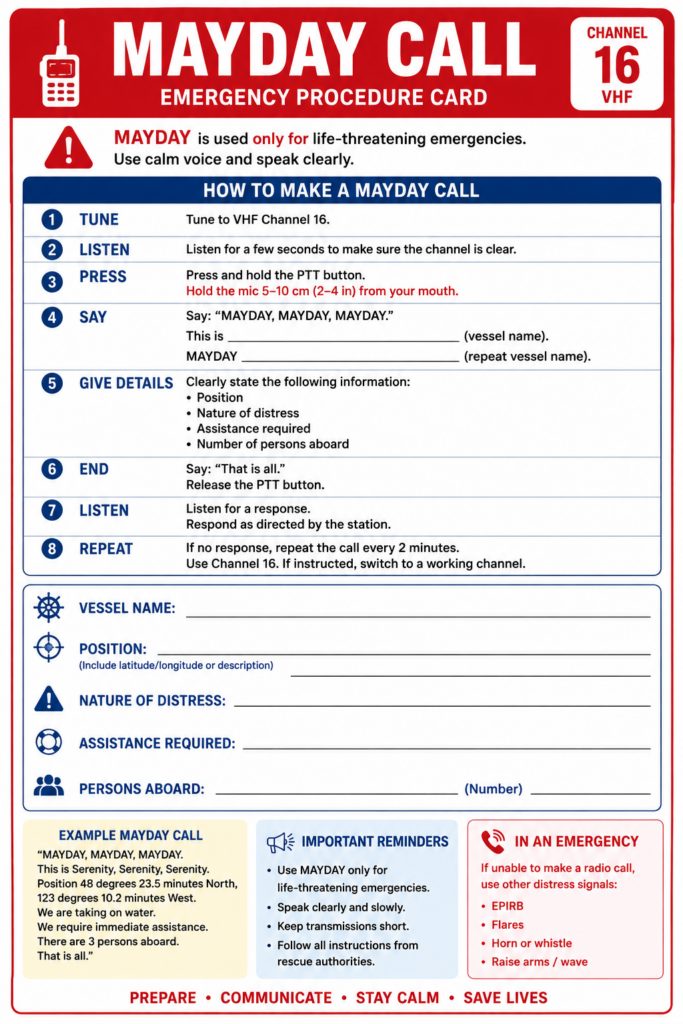
How to Make a Mayday Call
This is one procedure worth practicing.
Don’t wait until you’re frightened, cold and watching water rise across the cabin sole before trying to remember what comes next.
The distress voice call is made on Channel 16.
A practical structure is:
MAYDAY, MAYDAY, MAYDAY
THIS IS [VESSEL NAME × 3]
Then give the distress message:
MAYDAY [VESSEL NAME]
MMSI, IF AVAILABLE
POSITION
NATURE OF DISTRESS
ASSISTANCE REQUIRED
NUMBER OF PEOPLE ABOARD
OTHER IMPORTANT INFORMATION
OVER
For example:
“MAYDAY, MAYDAY, MAYDAY.
THIS IS WIND WALKER, WIND WALKER, WIND WALKER.
MAYDAY WIND WALKER.
MMSI, IF AVAILABLEOur position is approximately one nautical mile southwest of Entrance Island.
We have struck a submerged object and are taking on water rapidly.
We require immediate assistance.
Four persons aboard. All wearing lifejackets.
Wind Walker is a 32-foot sailing vessel with a white hull and blue stripe.
Over.”
Release PTT.
Listen.
If nobody responds, transmit the distress call again.
Don’t worry about producing a flawless performance.
If you’re in genuine distress, communicate the essential information.
Who are you?
Where are you?
What’s wrong?
What help do you need?
How many people are aboard?
Those facts matter far more than sounding polished.
Position: The Information Rescuers Absolutely Need
Imagine hearing this transmission:
“Mayday! We’re sinking! Please help!”
You know the problem.
But there’s one enormous piece of information missing.
Where are they?
A distress call is dramatically more useful when rescuers know where to go.
Every skipper should therefore know how to obtain the boat’s current position quickly.
It may be available from:
- chartplotter
- GPS/GNSS receiver
- properly integrated VHF
- navigation instruments
- navigation app
- paper chart and known landmarks
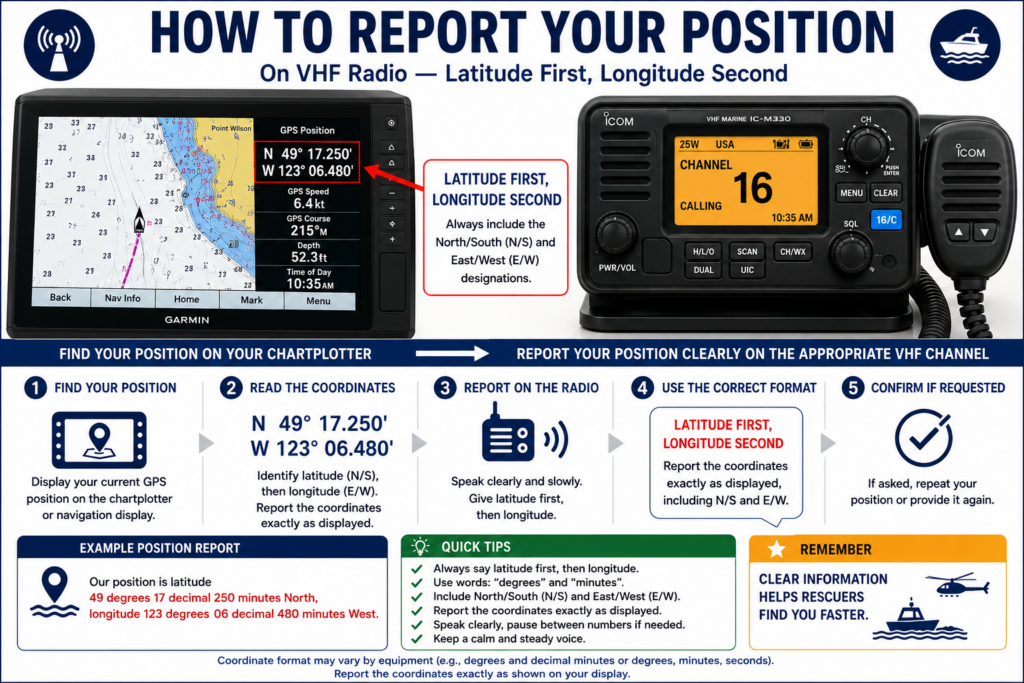
Latitude is normally stated before longitude.
Read coordinates carefully.
Slow down.
If necessary, write them down before transmitting.
A single incorrect number can send rescuers in the wrong direction.
What If You Don’t Know Your Coordinates?
Don’t invent them.
And don’t remain silent because you can’t find the GPS page.
Give the best accurate position you have.
For example:
“Approximately one nautical mile west of Point Cowan, Bowen Island.”
That is much more useful than:
“We’re near Vancouver.”
You can also report:
- distance and direction from a lighthouse
- nearby buoy
- island
- harbour entrance
- headland
- bridge
- marina
- other unmistakable charted feature
If you’re drifting, say so.
If you know the direction of drift, include it.
Accurate yet approximate information is better than precise-looking incorrect information.
PAN-PAN: Urgent, But Not Yet Mayday
Not every serious problem is a Mayday.
The urgency signal is:
PAN-PAN
It is spoken three times:
“PAN-PAN, PAN-PAN, PAN-PAN.”
Pan-Pan indicates an urgent message concerning the safety of a vessel or person where assistance may be required, but the circumstances do not presently meet the Mayday threshold of grave and imminent danger.
Possible examples include:
- loss of steering
- machinery failure creating a safety concern
- a medical problem that requires assistance but is not immediately life-threatening
- a disabled vessel in circumstances that could deteriorate
Again, context matters.
Suppose your engine quits on a sailboat.
You’re three miles offshore.
The wind is moderate.
Your sails work.
The boat is completely controllable.
That probably isn’t a distress situation.
Now change the circumstances.
You’re inside a narrow channel.
The wind has died.
A strong current is carrying you toward a hazard.
Suddenly the same engine failure has much greater significance.
Good seamanship means evaluating the whole situation, not simply naming the failed equipment.
SÉCURITÉ: Important Safety Information
The third signal is:
SÉCURITÉ
It introduces important navigational or meteorological safety information.
You might hear Sécurité associated with information about:
- navigation hazards
- significant weather
- floating debris or obstructions
- damaged or malfunctioning aids to navigation
- other hazards important to vessels in the area
As a recreational beginner, you’re more likely to hear Sécurité messages than originate them.
When you hear:
“SÉCURITÉ, SÉCURITÉ, SÉCURITÉ…”
listen.
The message that follows may affect your voyage.
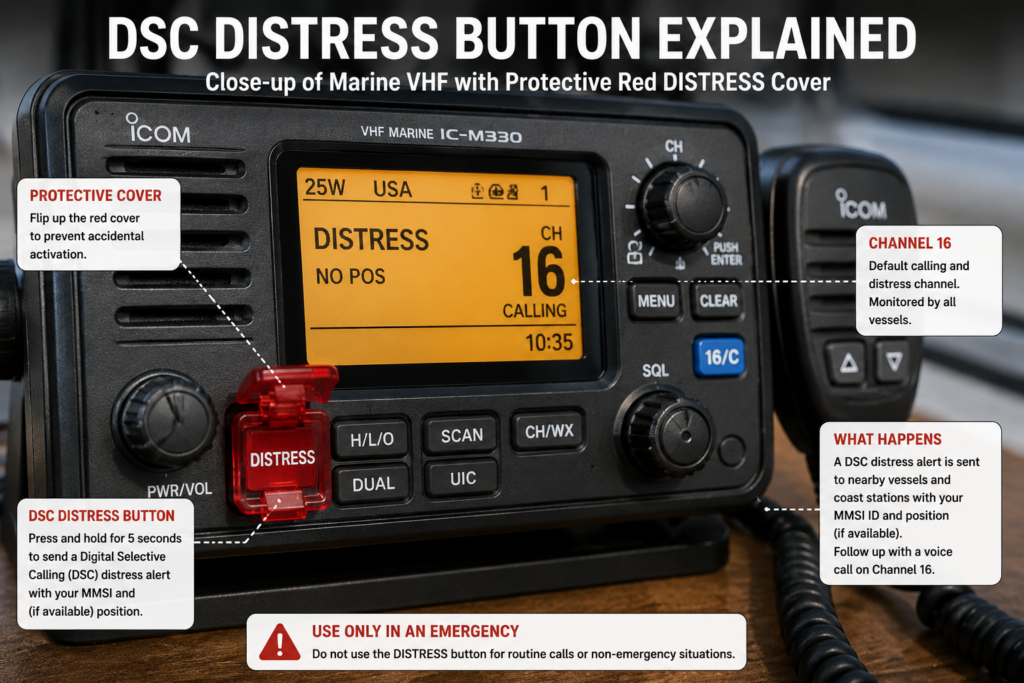
DSC: Understanding the Red Distress Button
Modern marine VHF radios often include Digital Selective Calling, abbreviated:
DSC
This is an extremely valuable marine safety feature.
Look at a modern fixed VHF and you’ll probably see a red button marked:
DISTRESS
It is usually protected by a small cover.
That’s deliberate.
You don’t want to activate it accidentally.
A properly configured DSC radio can send a digital distress alert.
That alert can identify the vessel through its MMSI.
When the radio has valid position information available, the distress alert can also transmit position information.
Think about how valuable that could be.
Instead of beginning an emergency communication with rescuers knowing nothing about you, the digital system may immediately provide crucial identifying and position data.
But only if the system has been configured correctly.
What Is an MMSI Number?
DSC introduces another acronym:
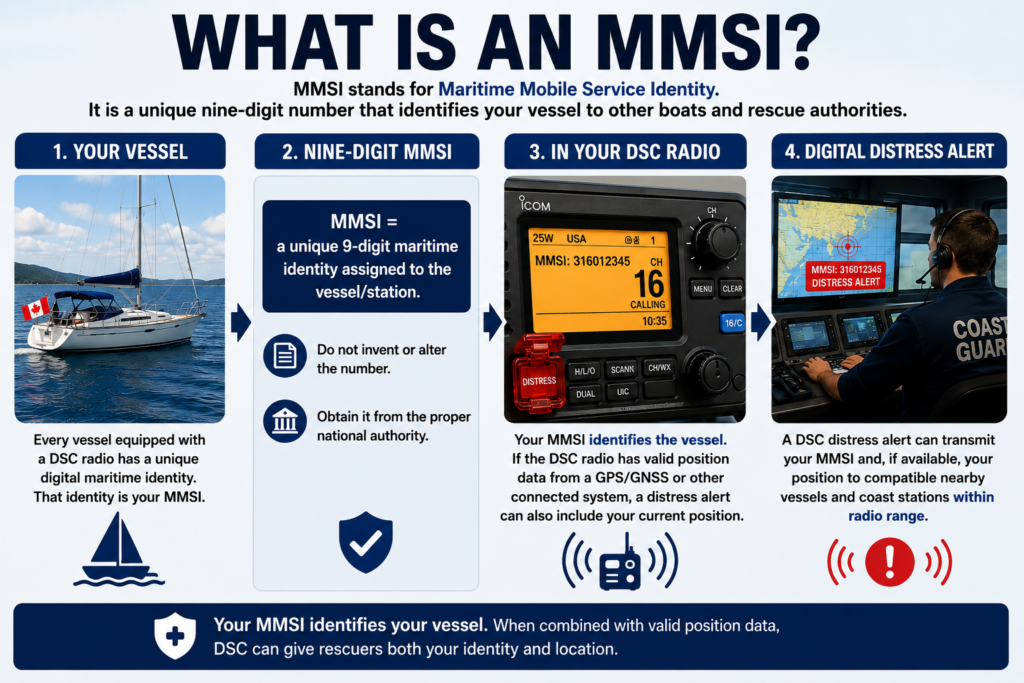
MMSI — Maritime Mobile Service Identity
An MMSI is a unique nine-digit maritime identity used by digital marine communication systems.
For a beginner, a useful analogy is to think of it as part of the vessel’s digital radio identity.
Your DSC radio uses the MMSI to identify the station electronically.
This is why you should never make up a number.
And you should never casually enter an MMSI into a radio because you’re “pretty sure” you copied it correctly.
Some marine radios restrict the number of times the MMSI can be entered or changed by the owner. Correcting an incorrectly programmed number can require assistance from a dealer or manufacturer.
Check carefully.
Then check again.
Canadian boat owners should obtain and manage their MMSI through the appropriate Canadian authority. Canadian vessel owners can find official information about obtaining and managing an MMSI through Innovation, Science and Economic Development Canada.
Why DSC Needs Position Information
The MMSI answers one question:
Who is calling?
Rescuers still need another answer:
Where are they?
That’s why the position side of the DSC system matters.
Depending on your equipment, position data might come from:
- a GPS/GNSS receiver built into the radio
- an external GPS
- a chartplotter
- the boat’s NMEA navigation network
Look at your VHF.
Does it show current position information?
If it doesn’t, don’t simply assume everything is fine.
Find out why.
This is a good project to complete while the boat is securely tied to the dock.
A sophisticated DSC radio that doesn’t know the vessel’s identity or position isn’t providing the full safety capability it was designed to provide.
How the DSC Distress Button Is Used
Exact operation varies by radio, so read the manual for your specific model.
That is important.
Don’t rely entirely on instructions for somebody else’s radio.
Many DSC radios allow you to select the nature of distress if circumstances and time permit.
The operator then activates the protected distress control according to the manufacturer’s procedure, commonly by pressing and holding it for a specified time.
The digital distress alert is transmitted.
Follow it with the appropriate voice Mayday communication on Channel 16.
Think of the two systems as working together.
The DSC transmission provides digital information.
Your voice explains the situation.
One more rule:
Never press the distress button just to see whether it works.
It isn’t a test button.
Learn the Marine Phonetic Alphabet
Imagine trying to identify your boat over a weak radio signal.
“That’s B…”
Did you say:
B?
D?
P?
V?
Several letters sound remarkably similar when transmitted through static and background noise.
The international phonetic alphabet solves the problem.
Each letter is represented by a distinctive word.
| Letter | Phonetic Word | Letter | Phonetic Word |
|---|---|---|---|
| A | Alfa | N | November |
| B | Bravo | O | Oscar |
| C | Charlie | P | Papa |
| D | Delta | Q | Quebec |
| E | Echo | R | Romeo |
| F | Foxtrot | S | Sierra |
| G | Golf | T | Tango |
| H | Hotel | U | Uniform |
| I | India | V | Victor |
| J | Juliett | W | Whiskey |
| K | Kilo | X | X-ray |
| L | Lima | Y | Yankee |
| M | Mike | Z | Zulu |
There are two spellings worth noticing.
It is internationally written Alfa, not Alpha.
And Juliett uses two Ts.
Suppose you need to transmit the letters:
KLM
Instead of:
“K… L… M…”
you can say:
“Kilo Lima Mike.”
That’s much harder to misunderstand.
Don’t worry if you can’t memorize the entire alphabet immediately.
Print it.
Put it beside the radio.
Use it.
Eventually the words become familiar.
Position Reporting: Slow Down
Position reports deserve special attention because numbers are easy to misunderstand over radio.
Suppose your GPS gives your position as:
49° 18.4′ N
123° 21.7′ W
Don’t race through it.
Speak deliberately.
Something along the lines of:
“Position four-nine degrees, one-eight decimal four minutes North; one-two-three degrees, two-one decimal seven minutes West.”
The receiving station may repeat the position back.
Listen carefully.
If they read it incorrectly, correct it.
This isn’t the moment to worry about whether you’re taking too long.
An extra few seconds spent communicating an accurate location can save far more time during a rescue.
What Should You Do If You Hear a Mayday?
Suppose you’re sailing along and suddenly hear:
“MAYDAY, MAYDAY, MAYDAY…”
Your radio is no longer background noise.
Listen carefully.
Stop unnecessary transmissions.
Write down the information if possible.
Listen for a Coast Guard or other station to acknowledge the distress.
If the call is being handled, don’t clutter the channel.
If it appears to be unanswered, proper marine radio training teaches procedures for acknowledging or relaying distress communications when appropriate.
The beginner principle is simple:
Distress traffic has priority.
Stay off the channel unless you have something useful to contribute.
And remember that your boat may be closer to the distressed vessel than professional rescuers are.
Your VHF Radio Is Also for Listening
We spend so much time teaching beginners how to transmit that it’s easy to overlook half of the radio’s job.
Listen.
Your VHF can alert you to:
- distress traffic
- safety messages
- navigational hazards
- important weather information
- vessel traffic
- Coast Guard communications
- local marine operations
This is one reason the radio should be part of your normal pre-departure routine.
Turn it on before you leave.
Set the volume.
Set the squelch.
Then let it do its job.
Build the VHF Into Your Pre-Departure Routine
When you’re learning to sail, there can seem to be an endless list of things to check before leaving the dock.
Lines.
Fenders.
Engine.
Weather.
Crew.
Navigation.
Safety equipment.
The radio belongs on that list.
Before departure:
- Turn the VHF on.
- Set the volume.
- Adjust squelch.
- Confirm the radio is receiving normally.
- Check the antenna system for obvious problems.
- Confirm the correct MMSI is programmed if DSC equipped.
- Confirm current position information is available to the DSC radio.
- Check the handheld VHF battery if you carry one.
- Make sure the crew know where the radio is.
- Keep emergency radio instructions beside the set.
After you’ve done this a few times, it becomes routine.
That’s exactly what you want.
Add these radio checks to the same pre-departure routine you use when preparing dock lines, fenders, crew and your departure plan.
Keep a Mayday Card Beside the Radio
This may be one of the simplest safety improvements you can make.
Create a laminated emergency card and keep it beside the VHF.
Include:
VESSEL NAME
CALL SIGN, IF APPLICABLE
MMSI
VESSEL DESCRIPTION
VESSEL LENGTH
Then include the basic Mayday sequence:
MAYDAY × 3
THIS IS [VESSEL NAME × 3]
MMSI, IF AVAILABLE
POSITION
NATURE OF DISTRESS
ASSISTANCE REQUIRED
PERSONS ABOARD
OTHER IMPORTANT INFORMATION
Why print something you could memorize?
Because emergencies change the way people think.
Stress makes simple tasks harder.
A frightened person may forget information they knew perfectly well five minutes earlier.
The card also helps someone who isn’t the skipper.
Which leads us to an important question.
Could Your Crew Use the Radio Without You?
You’re the skipper.
You know the boat.
You understand the VHF.
Great.
Now imagine that you’re the person who falls overboard.
Can your partner use the radio?
Can your friend?
Could your teenage child?
At least one other regular crew member should know:
- how to turn on the VHF
- how to select Channel 16
- how to use PTT
- where the DSC distress button is
- how to find the boat’s position
- the vessel’s name
- how to make a Mayday call
This doesn’t require a two-hour lecture.
Show them.
Then let them physically handle the radio while the boat is safely secured.
Knowing where the controls are isn’t the same as having practised with the radio. Never press the DSC distress button except in a genuine emergency or during an authorized test performed according to official and manufacturer instructions.
The skipper may be the person who needs rescuing.
Common Marine VHF Mistakes Beginners Make
Learning good habits is easier when you know what bad habits look like.
1. Leaving the Radio Turned Off
You can’t hear safety information if the radio isn’t operating.
Turn it on as part of your departure routine.
2. Using Channel 16 for Long Conversations
Channel 16 has an important safety purpose.
Establish contact and move routine traffic elsewhere when appropriate.
3. Not Listening Before Transmitting
Wait until the channel is clear.
4. Speaking Too Quickly
Slow down.
Especially when transmitting names, numbers or positions.
5. Shouting
A microphone isn’t improved by yelling into it.
Speak clearly at the proper distance.
6. Forgetting to Release PTT
If you’re still holding the button, you’re still transmitting.
Release it and listen.
7. Setting Squelch Too High
You may suppress weaker transmissions.
8. Always Using Maximum Transmit Power
Use the power appropriate to the communication.
9. Not Knowing Your Position
This can turn a distress call into a guessing game for rescuers.
Know where your position is displayed.
10. Never Programming the MMSI
Buying a DSC-equipped radio and never properly configuring its digital identity wastes an important capability.
11. Programming the Wrong MMSI
Double-check before entering it.
12. Failing to Connect Position Information
Confirm the radio is receiving current location data.
13. Treating Every Problem as a Mayday
Mayday has a specific meaning.
Assess the danger.
14. Waiting Too Long to Call for Help
This is the opposite problem.
Don’t allow concern about “bothering” someone to prevent you from communicating when a genuine emergency is developing.
15. Assuming a Cellphone Replaces VHF
Cellphones are useful.
They don’t provide the same marine broadcast capability.
16. Being the Only Person Who Knows the Radio
Teach your crew.
Mayday or Pan-Pan? Think About the Situation, Not Just the Failure
This is one of the most important judgment lessons in the article.
Imagine that your engine stops.
Is it a Mayday?
You can’t answer that from the information provided.
Where are you?
Can you sail?
What’s the weather doing?
Is there current?
Are you drifting toward danger?
Is anyone injured?
Do you have an anchor?
Are you in a shipping channel?
The mechanical failure alone doesn’t determine the radio call.
The danger does.
That same principle appears throughout seamanship.
A torn sail isn’t automatically an emergency.
A grounding isn’t automatically a Mayday.
An engine failure isn’t automatically a Pan-Pan.
Evaluate what is actually happening to the boat and crew.
And continue reassessing.
A manageable situation can deteriorate.
A Pan-Pan situation can become a Mayday.
Don’t become so attached to your original assessment that you fail to recognize when circumstances have changed.
Canadian Sailors: Understand ROC-M
If you’re boating in Canada, there is another important piece of the VHF puzzle.
Operating a marine radio requires the appropriate radio operator qualification.
For most recreational boaters, that means the:
Restricted Operator Certificate — Maritime (ROC-M)
The ROC-M is not simply another piece of boating paperwork.
The training teaches practical radio procedure, including distress and urgency communications.
That’s worth doing even if you feel comfortable after reading this article.
An online article can explain the system.
Formal radio training gives you the opportunity to learn the procedures properly and earn the required operator qualification.
Keep one distinction clear:
Your ROC-M identifies your qualification as an operator.
The MMSI identifies the vessel/station electronically within applicable digital maritime systems.
They are not the same thing.
Canadian recreational sailors should review the official requirements for marine radio operator certification and obtain their ROC-M before operating marine radio equipment.
Marine VHF Doesn’t Replace Seamanship
There is a danger with all safety technology.
We start thinking the technology itself makes us safe.
It doesn’t.
A VHF radio doesn’t make poor weather judgment safe.
DSC doesn’t make a dangerous anchorage safe.
A GPS doesn’t make careless navigation safe.
A Mayday call doesn’t undo a preventable accident.
These systems provide another layer of protection when things go wrong.
The better approach is still to prevent the emergency whenever possible.
Check the weather.
Maintain the boat.
Understand your navigation.
Wear appropriate flotation.
Reef before you’re overwhelmed.
Keep a proper lookout.
Practice person-overboard recovery.
Carry suitable emergency equipment.
Know how to anchor.
And know how to communicate.
A Simple Beginner VHF Routine
There is a lot of information in this article.
You do not need to memorize everything today.
Instead, develop a routine.
Before leaving the dock:
Turn the radio on.
Set the volume and squelch.
Confirm the radio is receiving.
Confirm your DSC/MMSI configuration.
Confirm the radio has current position information.
Then while underway:
Listen.
Before transmitting:
Think.
Then:
Press → pause → speak clearly → release → listen.
For routine communication:
Call → establish contact → move to an appropriate working channel.
For an emergency:
Know your position.
Then communicate:
Who you are → where you are → what’s wrong → what help you need → how many people are aboard.
That’s a manageable foundation.
Everything else can be built on top of it.
Final Thoughts: Don’t Be Afraid of the Microphone
The first few times you use a marine VHF radio, you may feel self-conscious.
That’s normal.
Everyone else on the channel sounds as though they’ve been doing it forever.
They haven’t.
They learned too.
And you don’t need to sound like a Coast Guard radio operator.
You need to communicate clearly.
The easiest way to become comfortable is to use the radio correctly during ordinary situations.
Listen to marine traffic.
Learn the controls.
Call a marina when appropriate.
Practice finding your position.
Learn the phonetic alphabet.
Show your crew how the radio works.
Keep the Mayday procedure beside the set.
Make sure DSC, your MMSI and your position source are properly configured.
Then, if the day ever comes when you genuinely need that radio, you won’t be staring at an unfamiliar microphone wondering what to do.
You’ll pick it up.
You’ll know where you are.
You’ll know what channel to use.
And you’ll know what to say.
That’s the real goal.
Not becoming a radio expert.
Becoming a sailor who is prepared.